Swim Analytics Categories for Clubs
TLDR
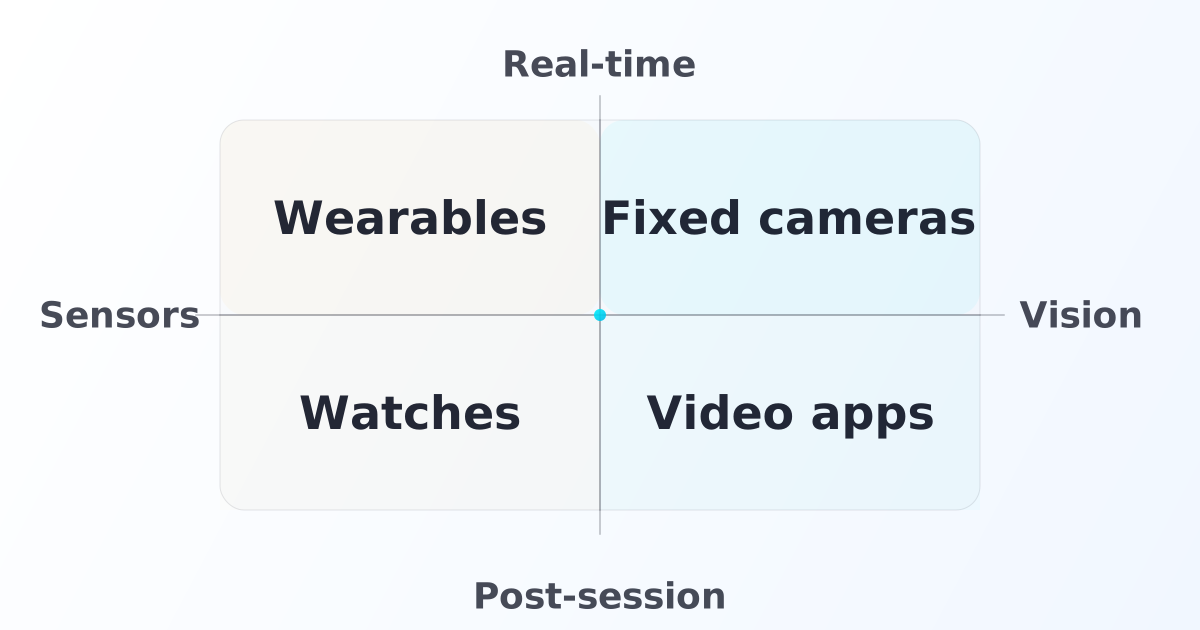
- Most swim analytics tools fit into a simple 2x2: real-time vs post-session and vision vs sensors.
- Wearables are usually strongest when you need portable, per-swimmer measurement without installing cameras (example: TritonWear; FORM goggles). 1 2
- Video apps are usually strongest for post-session technique review (example: Dartfish; OnForm). 3 4
- "Best" depends on what your club needs: for multi-lane, in-practice decisions and scalable technique understanding, real-time vision tends to win; technique-level sensor setups usually require more instrumentation and complexity.
- If your club needs multi-lane coverage and real-time technique feedback in one system, vision-based real-time is the only quadrant that delivers both without per-swimmer device scaling.
1) Why swimming analytics is becoming harder to ignore
If you only want the short answer, pick based on what you need this season:
- Want the lightest workflow? Start with post-session vision (video apps).
- Want portable individual data? Start with real-time sensors (wearables).
- Want multi-lane, in-practice decisions and technique understanding at team scale? Look at real-time vision.
- Want basic trends with almost zero setup? Post-session sensors (watches) can be a starting point, but expect limited technique insight.
Clubs feel pressure from three directions:
- Coach bandwidth: one coach can't objectively monitor 20–30 swimmers, every rep, every day.
- Parent expectations: families increasingly expect visible progress, not "I think so."
- Competition: clubs compete on outcomes and experience, not only pool time.
Analytics doesn't replace coaching. It reduces guesswork and makes feedback easier to scale. If you're comparing named vendors rather than categories, start with SwimMate vs TritonWear vs FORM.
2) The 2x2: real-time vs post-session, vision vs sensors
This is the cleanest way to classify what you're actually buying.
| Vision (cameras, video) | Sensors (wearables, devices) | |
|---|---|---|
| Real-time | Live video + live feedback | Live device metrics during practice |
| Post-session | Record now, review later | Record now, sync later |
Two practical notes:
- "Real-time" only matters if it changes what a coach does during the session.
- For clubs, the hidden axis is multi-swimmer vs per-swimmer. Anything per-swimmer scales cost/logistics with headcount.
- Technique is the other hidden axis: video makes technique review straightforward; technique-level sensor setups add instrumentation and calibration that can be hard to scale to a full squad.
3) Iconic products in each domain (examples)
These are examples, not endorsements.
| Quadrant | Examples |
|---|---|
| Real-time + Sensors | TritonWear; FORM goggles 1 2 |
| Post-session + Vision | Dartfish; OnForm 3 4 |
| Post-session + Sensors | Apple Watch and consumer swim watches 5 |
| Real-time + Vision | Fixed-camera systems in other sports (analogs): Hudl Focus; PlaySight 6 7 |
4) Why real-time vision is best for clubs that need X (and not best for everyone)
Real-time vision tends to win when your club needs:
- Multi-lane coverage without handing out and managing devices
- Full-session visibility (not just a few filmed moments)
- In-practice adjustments (pace compliance, turns/underwaters, lane management)
- Higher feedback frequency without stopping the workout
Technique is a practical differentiator between real-time vision and real-time sensors:
- With vision, coaches and swimmers can review technique visually (body position, timing, and key angles) using video.
- With sensors, you can get portable signals, but if you want elbow-angle-level technique you can't do it with a single device. You need multiple sensors across the body (for example arms and torso), plus calibration. That's inconvenient, expensive, and not scalable to an entire club session.
When real-time vision is usually not the best first step:
- You don't control consistent pool time (shared pool constraints)
- You can't operationalize consent and session boundaries yet
- Your staff can't commit to a minimal workflow change for the first 30 days
In those cases, a wearable or a post-session video workflow can be the right start.
5) Head-to-head comparison table
This table compares the most widely used swim analytics products on the dimensions that matter most for clubs making a purchase decision. Data reflects publicly available product information; verify current pricing and features with each vendor. 1 2 3 4 8
| Product | Category | Real-time? | Multi-lane? | Technique analysis? | Best for |
|---|---|---|---|---|---|
| TritonWear | Real-time sensors | ✓ Yes | Per-device | Stroke metrics (no video) | Individual athlete tracking; portable setup |
| FORM Goggles | Real-time sensors | ✓ Yes | Per-device | HUD metrics (no video) | Self-coached or individual training focus |
| Dartfish | Post-session vision | ✗ No | Multi-angle | Full technique review | Post-session video analysis; national federations |
| OnForm | Post-session vision | ✗ No | Single-angle | Video annotation | Coach-athlete video feedback workflows |
| Apple Watch / Garmin | Post-session sensors | ✗ No | Per-device | No technique | Basic lap/pace tracking; low-friction personal use |
| SwimMate | Real-time vision | ✓ Yes | ✓ Yes (multi-lane) | Video + live metrics | Club teams needing multi-lane, in-practice feedback |
How to read this table: If multi-lane coverage and real-time feedback both matter, only the bottom row covers both. If portability matters more than scale, the sensor rows are the right focus.
6) How to make the final call (by club size and goal)
Different clubs have different constraints. Here are three practical scenarios. If you are deciding between meet infrastructure and practice analytics, use Swim timing systems vs training analytics first so you do not compare the wrong categories.
Small club (under 30 swimmers)
At this size, per-swimmer devices are manageable. TritonWear or FORM goggles can work well if you have the device management budget and parent buy-in. Post-session video apps (OnForm, Dartfish) are a lightweight starting point for technique work. Multi-lane camera systems are available but may exceed the near-term value threshold if you're still building your analytics workflow.
Mid-size club (30–80 swimmers)
This is where per-device costs and logistics start to become real constraints. Handing out 50+ wearables before every practice, collecting them, charging them, and troubleshooting connectivity is a meaningful operational burden. Multi-lane vision systems start to make financial and operational sense here because the cost-per-swimmer drops and the coach time saved scales with headcount.
Elite or performance squad
At this level, you likely want both: real-time in-practice metrics for the whole group, plus deeper technique review tools. Many elite programs use video as the foundation (for coach review, replay, and parent communication) and layer wearable data on top for the swimmers who need it most.
FAQ
What is swim analytics software?
Swim analytics software is any tool that helps coaches and swimmers turn practice into measurable signals: pace consistency, technique review, progress trends, and feedback workflows.
What is real-time swim analytics?
Real-time swim analytics means feedback arrives fast enough to change what happens in the set: pace compliance, turn focus, or coach attention allocation during practice.
What is the best swim analytics product?
There isn't one universal "best." Clubs choose based on whether they need real-time decisions, multi-lane coverage, and technique understanding at team scale (which tends to push toward real-time vision) versus portability and per-swimmer tracking (which pushes toward wearables).
What is the difference between swimming video analysis software and swim analytics?
Video analysis focuses on technique review and communication. Swim analytics can include video, but also includes metrics, longitudinal tracking, and workflows that make feedback repeatable.
Are swim wearables good for clubs?
Wearables can be great for portable, per-swimmer tracking. The tradeoff is that device logistics scale with swimmer count, and technique-level sensing is harder to scale than video.
Can Apple Watch track swim workouts?
Apple Watch supports swim workouts and tracks swim-related metrics as part of its workout features. 5
What is swim video analysis software?
Swim video analysis software helps coaches and swimmers review technique using recorded clips, annotations, angles, and side-by-side comparisons.
How does SwimMate compare to TritonWear?
TritonWear uses per-swimmer wearable devices and delivers real-time sensor metrics (stroke count, distance per stroke, efficiency). SwimMate uses overhead cameras and delivers real-time vision-based metrics (lap times, pace, stroke rate, turns) across multiple lanes simultaneously without per-swimmer devices. The right choice depends on whether you prioritize portability and individual tracking (TritonWear) or multi-lane coverage and technique video (SwimMate).
What is the best swim analytics tool for youth clubs?
For youth clubs, the most important factors are: privacy and consent compliance (especially for under-13 athletes under COPPA), operational simplicity, and whether the product form scales to the full squad without per-swimmer device costs. Vision-based systems tend to have a lower per-swimmer cost at scale; wearables require device management and consent at the individual level.
Related reading
- Head-to-head comparison post
- ROI + adoption framing for clubs
- Pool privacy playbook (filming vs data privacy)
References
Footnotes
-
TritonWear: https://www.tritonwear.com/ ↩ ↩2 ↩3
-
FORM Smart Swim: https://www.formswim.com/ ↩ ↩2 ↩3
-
Dartfish swimming: https://www.dartfish.com/swimming/ ↩ ↩2 ↩3
-
OnForm swimming: https://onform.com/sports/swimming/ ↩ ↩2 ↩3
-
Apple Support: "Go for a swim with Apple Watch": https://support.apple.com/guide/watch/go-for-a-swim-apd3badf833c/watchos ↩ ↩2
-
Hudl Focus (fixed camera capture, category analogy): https://www.hudl.com/products/focus/details ↩
-
PlaySight (sports camera platform, category analogy): https://playsight.com/ ↩
-
SwimMate AI swim training system: https://swimai.net ↩